
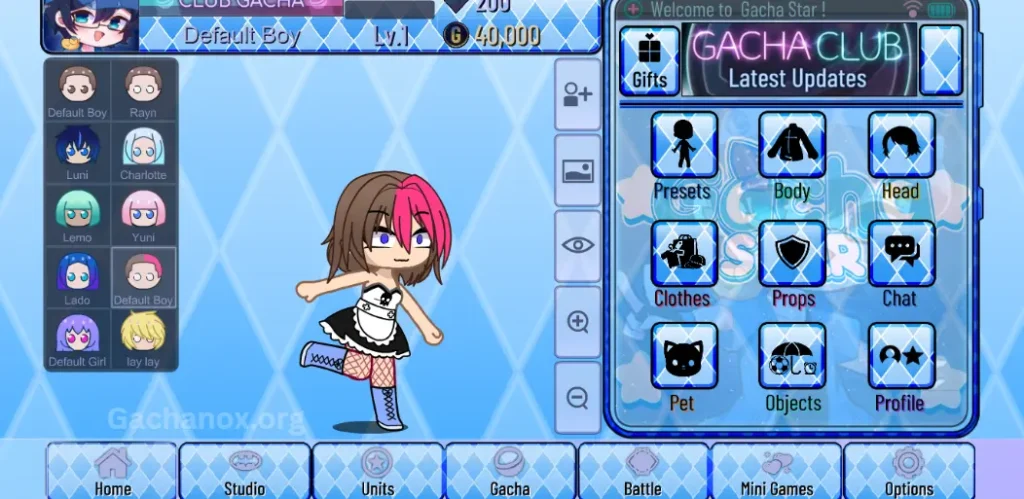
Welcome to the vibrant world of Gacha, where creativity meets imagination to bring immersive virtual experiences to life.
This comprehensive user guide explores the boundless potential of the Gacha Star Mod, a powerful tool designed for players who crave complete creative control. Whether you’re a seasoned Gacha creator or just stepping into the scene, this guide walks you through everything you need—from technical specifications to seamless installation steps—so you can personalize every detail of your Gacha world.
We also touch on GachaNox APK, another standout Gacha Mod known for its flexibility and visual customization features.
Get ready to unlock new layers of storytelling, design stunning characters, and build mesmerizing scenes. Let’s dive into the endless possibilities waiting in the starry realm of Gacha.
What is Gacha Star Mod?
Gacha Star Mod is a fan-made modification of the original Gacha Club game, built to give users extended creative freedom and access to enhanced features. Think of it as a toolkit for creators—packed with exclusive outfits, poses, backgrounds, and customization options that aren’t available in the base game. Whether you’re designing original characters (OCs), scripting your next visual story, or building an animated series, Gacha Star Mod is designed to elevate your creative process.
Why Choose Gacha Star Mod?
- Expanded Customization
Gacha Star Mod takes customization to new heights. You’re no longer limited by default templates—create unique characters with new hairstyles, eye styles, accessories, and more. - Exclusive Content
Access rare and original in-game assets including custom backgrounds, animated effects, and updated character slots that allow for greater complexity and storytelling depth. - No Restrictions, Pure Creativity
Unlike some mods or versions that lock premium features behind paywalls or level requirements, Gacha Star Mod offers a fully unlocked experience from the moment you install.
Key Features
- Over 300+ customizable character slots
- New color palettes for hair, eyes, and outfits
- Advanced layering and animation effects
- Studio Mode with expanded scene-building options
- Seamless UI improvements for a smoother design flow
You may also like it:
Exploring Gacha Mod – A Modified Version for Gacha Life Lovers
How to Download and Use the Fun-filled Gacha Plus Mod
Gacha Art Mod – a Perfect Tool for All Aspiring Gacha Artists
How to Install Gacha Star Mod
Step 1: Download the APK File
Visit a trusted modding community or fan site to download the latest version of the Gacha Star Mod APK. Make sure the source is secure and malware-free.
Step 2: Enable Unknown Sources
Before installation, go to your device settings and allow installation from unknown sources. This step ensures that third-party APKs can be installed on your device.
Step 3: Install the Mod
Locate the downloaded file and begin the installation process. Once completed, launch the app and dive straight into character creation.
Note: Gacha Star Mod is currently available for Android devices. For iOS users, alternative installation methods may be required or limited due to Apple’s security policies.
Bonus: What About GachaNox?
If you’re exploring Gacha Mods, GachaNox is another name worth knowing. Known for its dark-themed UI and enhanced aesthetic tools, GachaNox complements Gacha Star well—especially for creators looking to switch moods and style palettes between projects.
Frequently Asked Questions
What is Gacha Star Mod?
Gacha Star Mod is a fan-created version of the original Gacha Club game. It offers enhanced character customization, new assets, unlocked features, and expanded design tools, giving users more freedom to create unique characters and scenes.
Is Gacha Star Mod free to use?
Yes, Gacha Star Mod is completely free. It’s a non-commercial mod made by fans for the Gacha community. Be cautious of any websites asking for payment or personal data.
Is Gacha Star Mod safe to download?
As long as you download the APK from a reputable and trusted source, the mod is generally safe. Avoid unknown or suspicious websites, and always scan files with antivirus software before installing.
Can I use Gacha Star Mod on iOS devices?
Currently, Gacha Star Mod is primarily available for Android devices. iOS installation is limited due to Apple’s app security restrictions. iOS users may need to wait for a web-based or PC-compatible version.
Will Gacha Star Mod overwrite my original Gacha Club data?
No, Gacha Star Mod installs as a separate app. It won’t affect your original Gacha Club game or saved data unless you delete or overwrite files manually.
Do I need to root my Android device to install the mod?
No rooting is required. You just need to enable “Install from unknown sources” in your device settings to install the APK file.
What makes Gacha Star different from GachaNox?
While both mods enhance Gacha Club, Gacha Star focuses on expanded customization and vibrant design features, whereas GachaNox offers a darker UI theme and a unique aesthetic style. Both are great tools, depending on your creative needs.
Can I create stories or skits using Gacha Star Mod?
Absolutely. Gacha Star Mod comes with an enhanced Studio Mode, perfect for creating scenes, comics, roleplays, or animated stories. It’s ideal for storytellers and content creators.
Conclusion
Gacha Star Mod opens a galaxy of creative freedom for fans who want to push beyond the limits of the standard Gacha experience. With its expanded customization tools, vibrant assets, and fully unlocked features, it invites users to tell richer stories, design bolder characters, and explore new artistic frontiers.
Whether you’re a content creator, casual player, or passionate storyteller, Gacha Star Mod gives you the space to express your imagination without compromise. Combined with options like GachaNox, this mod represents a new era in Gacha-style creativity—limitless, dynamic, and truly your own.

